Best crypto trading calculators for position size, fees, and liquidation
Last updated: September 10, 2026
Key Takeaways
- The readers who benefit most here are perpetual futures traders, especially anyone using 3x, 5x, 10x, or higher leverage.
- A strong position-size calculator should force you to think in risk terms, not coin count.
- A good fee calculator separates maker and taker fees, because those are often different.
- I would not choose a “best crypto trading calculator” by name alone, because these tools are rarely universal.
Leverage makes numbers bite. Hard.
If you trade crypto with borrowed size, the calculator you want is the one that keeps position size, fees, and liquidation distance on the same screen instead of letting you guess. This guide focuses on crypto trading calculators for position size, fees, and liquidation, and I write about trading risk and portfolio math, so I’d narrow the field to three jobs: sizing the trade, estimating what the exchange will charge, and checking how close leverage puts you to liquidation. Not financial advice. For your own situation — especially if taxes or margin rules matter — consult a qualified adviser.
Most people do not need a flashy all-in-one app. They need something that spits out the right answer before the trade turns pricey. In practice, that means choosing between exchange calculators, standalone risk tools, and spreadsheet-style tools. Each one solves a different problem; each one breaks in its own way. A 1% mistake matters.
What problem are you actually trying to solve?

Choose the calculator around the decision in front of you: position size before entry, fee drag before you click, or liquidation risk before you add leverage. Those are three different questions, and generic “profit calculator” pages mash them together.
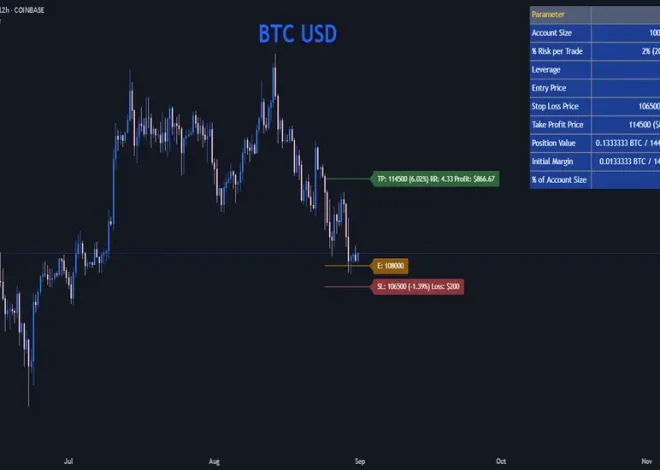
How many units can you buy or short if you only want to risk 0.5% or 1% of your account? That is what a position size calculator answers. Usually, it needs account size, entry price, stop-loss price, and sometimes leverage. So it fits spot traders and futures traders who already know their stop.
A fee calculator asks something simpler: how much will the exchange take when I enter and exit? That matters most on taker-heavy strategies, scalping, and short timeframes, where a 0.1% or 0.2% round trip can eat a thin edge. Exchanges use different maker/taker schedules, and some tack on funding for perpetual futures. A calculator that ignores funding is incomplete for leveraged positions. For fee schedules, check the exchange’s own fee page, such as Binance’s fee page or Coinbase Advanced’s pricing pages.
How far can price move against me before my margin is wiped? That is the liquidation question. It keeps people honest in futures markets. Also, it is the one most often misunderstood, because liquidation depends on leverage, margin mode, maintenance margin, fees, and sometimes whether you are in isolated or cross margin. If a calculator gives you just one number without stating those assumptions, treat it as approximate and check a professional if the trade is material.
I’d choose based on the trade in front of me, not the prettiest interface. If you trade spot and hate surprises, fee plus position size is enough. If you trade perpetuals, liquidation math becomes mandatory. Simple, but not easy.
Which calculators do position size best?
In crypto trading calculators for position size, the strongest tools are the ones that force you to think in risk terms, not coin count. For most traders, that means a calculator that asks for account balance, risk percentage, entry, and stop, then returns size in units and dollar risk. That setup is more useful than a tool that just converts between BTC, ETH, or stablecoins.
Exchange calculators usually win on convenience. Binance, Bybit, OKX, and Coinbase Advanced all provide built-in position or PnL tools on their futures or order-entry pages. Their strength is proximity: the calculator sits next to the trade ticket, so you can change leverage or size without copying numbers into another site. But there is a catch. Many exchange tools are built around that venue’s contract type and fee model, so they are not ideal if you want to compare across exchanges or model a strategy before deciding where to trade.
Standalone risk calculators are better when portability matters. A tool like CoinGecko’s crypto calculator pages or a dedicated risk calculator on a trading education site can help with quick sizing estimates without tying you to one venue. The drawback is plain: many stop at basic arithmetic and do not understand contract specs, maintenance margin, or exchange-specific fees. Fine for spot. Less fine for derivatives.
Use a position-size calculator if discipline matters more than speed. Wrong fit for readers who already know their risk in dollar terms and only need execution math. It is also the wrong tool if you do not have a stop-loss idea yet, because size without a stop is just a bigger bet. That math gets ugly fast.
What about fees and slippage?
The fee calculator matters most when your strategy trades often or your edge is small. If you enter and exit a lot, fees and spread are big enough that a quick back-of-envelope estimate can change whether a setup is worth taking.
The best fee calculators usually split maker and taker fees, because those are rarely identical. They should also let you choose whether the order is a market order, limit order, or futures fill. On many exchanges, maker fees are lower than taker fees, but that only helps if your order actually posts. A calculator that assumes maker fees for every trade is optimistic in the wrong direction.
Honestly, the weak spot is that a fee calculator can make trading look tidier than it is. It usually does not capture spread, partial fills, funding rates on perpetual futures, withdrawal costs, or slippage during volatile candles. Those costs are real. They are just harder to model. If a site presents fee math as “your total cost,” it is incomplete.
For that reason, I prefer exchange-native fee pages and calculators over third-party tools when the exchange publishes its own schedule clearly. A published fee schedule from the exchange itself is the source of truth for that venue. If you need to compare venues, use a spreadsheet or a calculator that lets you input different maker/taker rates manually. For reference, see Binance’s fee schedule and Coinbase Advanced’s pricing pages.
Not the right calculator for someone who wants a single yes-or-no answer on whether to enter. Fees are only one part of trade quality. They matter most for frequent traders, market-order users, and anyone trading size where a few basis points turn into real money.
How do liquidation calculators differ, and why do they matter?
Liquidation calculators are the most important of the three for futures traders, and they are the easiest to misread. The best ones state the liquidation price under explicit assumptions: isolated margin or cross margin, long or short, leverage used, and sometimes estimated fees.
A simple liquidation calculator is enough for a rough safety check. You enter entry price, leverage, and margin, and it gives you a liquidation estimate or a distance to liquidation. Useful? Yes. It turns abstract leverage into a concrete price level. If the calculator shows liquidation is uncomfortably close to your stop, the trade is probably too tight for that leverage. At 10x leverage, a 10% move against you can erase most or all of the margin before fees.
The snag is that liquidation is not a universal constant. Exchanges define maintenance margin differently. Some use tiered margin schedules, and your liquidation point can shift as position size grows. Cross margin adds another layer because the entire account balance can support the position. A calculator that ignores these details may give you the wrong sense of safety.
Here’s my take: trust exchange calculators first for liquidation math on that exchange, then use a separate risk tool as a second opinion. Exchange calculators at least reflect the venue’s own margin model, even if they still simplify. A third-party calculator can be useful for quick planning, but it cannot always mimic the exact engine the exchange uses. For background on margin and risk, see the CFTC’s margin guidance and the exchange’s own help center.
The readers who benefit most here are perpetual futures traders, especially anyone using 3x, 5x, 10x, or higher leverage. Spot traders and long-term holders should skip liquidation calculators, because liquidation is not the risk that threatens them. Their bigger problem is often allocation size, not forced closing. Apples and oranges.
The honest side-by-side
The better choice depends on what you need to know first: size, fees, or liquidation. Here is the comparison I would actually use.
| Criteria | Exchange-native calculators | Standalone crypto calculators | Winner for [condition] |
|---|---|---|---|
| Position sizing with stop-loss | Usually strong for that venue’s contracts and order ticket | Usually strong for general spot or futures sizing | Exchange-native if you trade on one venue; standalone if you compare venues |
| Maker/taker fee modeling | Best when the exchange publishes its own fee schedule | Often generic unless you enter rates manually | Exchange-native for same-venue trades |
| Liquidation estimate | Better chance of matching that exchange’s margin rules | Often approximate and may miss tiered maintenance margin | Exchange-native for leveraged futures |
| Cross-exchange comparison | Poorer, because each one reflects its own market | Better if it accepts custom inputs | Standalone |
| Funding-rate awareness | Sometimes included, sometimes not | Often missing | Neither is perfect; check the exchange’s funding page |
| Ease of use in a live order ticket | Usually faster, fewer copy-paste errors | Slower because it sits outside the platform | Exchange-native |
| Transparency of assumptions | Can be clear, but often tied to venue logic | Can be simpler, but also oversimplified | Standalone if it states formulas clearly |
| Best for spot-only traders | Sometimes overbuilt | Usually enough | Standalone |
The table looks straightforward, but the trade-off is real: exchange calculators are more useful operationally, while standalone calculators are better for planning and comparison. The wrong move is using a general calculator for a specific exchange’s liquidation rules and assuming the output is exact.
My verdict: which one should you use?
Choose exchange-native calculators if you trade on one venue, use futures, and need liquidation math that tracks the platform’s own margin model. Choose standalone calculators if you compare multiple exchanges, trade spot, or want a clean position-size and fee estimate before you log in. Neither is enough if you do not understand your stop-loss, your leverage, and your fee schedule; in that case, the calculator just makes the trade look more precise than it is.
That’s the simple call. If your main risk is getting liquidated, use the calculator tied to the exchange you are actually trading on. If your main risk is over-sizing or bleeding too much in fees, use a standalone calculator that lets you edit maker/taker assumptions and position risk manually.
I would not choose a “best crypto trading calculator” by name alone, because these tools are rarely universal. A calculator that is excellent for Binance futures may be awkward for Coinbase Advanced spot trading, and a neat mobile app may be useless once you need cross margin or contract tiers. For live trading, the best crypto trading calculators are the ones that fit the decision you are making right now.
When should you ignore the calculator and rethink the trade?
Rethink the trade when the calculator shows a mismatch between the setup and the leverage, not when it hands you a number you like. That is the moment it earns its keep.
The first exception is high-volatility news trading. If a token can gap hard around a listing, lawsuit, or macro event, a liquidation calculator may understate the speed of the move because it cannot model slippage well. In that setting, the output is a rough warning, not a protection plan.
The second exception is cross margin with multiple open positions. A simple liquidation calculator for one position can mislead you because your account equity is doing more than one job. If the tool does not clearly say it handles cross margin, assume it does not.
The third exception is exchange fee tiers and rebates. If your volume moves you into different tiers, or if your account benefits from discounts, a generic fee calculator without your actual tier is incomplete. Check the current fee schedule on the exchange itself.
The fourth exception is tax-lot complexity. A calculator can estimate gross PnL, but it will not solve your local tax treatment of crypto trades. Tax rules differ by country and change often, so use a tax professional for that part. When taxes or reporting are material, the calculator is only a starting point.
Those exceptions do not make calculators useless. They show where they stop being decision tools and become rough arithmetic.
Which crypto trading calculators are worth keeping open in a tab?
The ones worth keeping are the calculators that make you slower in the right place: before you size the trade, before you click market buy, and before you take leverage too lightly. For most readers, that means one exchange-native liquidation calculator and one standalone risk calculator, not a drawer full of tools.
I’d keep a platform calculator if you trade futures regularly on that platform. I’d keep a standalone calculator if you compare fee structures, trade spot, or want to sanity-check position size away from the order screen. I would not keep anything that hides assumptions, ignores maker/taker differences, or treats liquidation as a single universal formula.
Frequently asked questions
Do I need a liquidation calculator for spot trading?
No. Spot trading does not have liquidation in the futures sense, so a position-size or fee calculator is more useful.
What inputs matter most in a position-size calculator?
Account size, risk per trade, entry price, and stop-loss price matter most. If the calculator cannot handle those, it is too thin for serious use.
Are fee calculators accurate?
They are only as accurate as the inputs and assumptions. A calculator that ignores spread, funding, slippage, or tiered fees is giving you partial information.
Can one calculator cover Binance, Bybit, and OKX perfectly?
Usually not. Each exchange can have different contract specs, fee tiers, and margin rules, so exact outputs will differ by venue.
Is a liquidation calculator enough to make leverage safe?
No. It only shows an estimated price level, not the full risk of slippage, funding, or sudden volatility.